Choosing the Right Microsoft 365 Enterprise License: An Endpoint Admin’s Guide
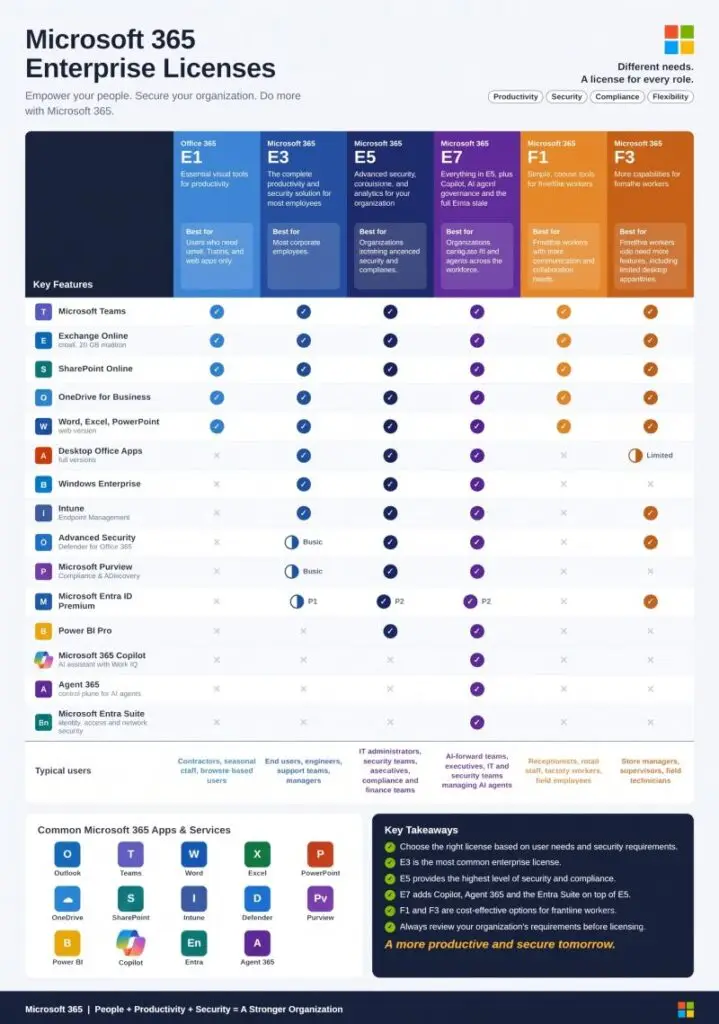
“What license do we actually need for that?” is a question that lands on the endpoint admin’s desk more often than it should. Someone wants Conditional Access enforced, someone else wants Copilot, procurement wants to know if F3 is enough for the warehouse team — and the honest answer depends on which Microsoft 365 tier is actually doing the work underneath the feature someone asked for. Here’s how the six enterprise tiers actually differ, without the marketing names doing the explaining for you.
Key takeaways
E3 is the baseline for any full-time knowledge worker who needs desktop Office apps and device management — it includes Intune and Microsoft Entra ID P1. E5 is what you need for risk-based Conditional Access, Privileged Identity Management, and full Defender XDR, because those require Entra ID P2, not P1. Microsoft 365 E7 (the “Frontier Suite,” GA since May 2026) bundles E5 with Copilot, the full Entra Suite, and Agent 365 into one SKU — it’s worth it specifically when Copilot adoption will cross roughly 40% of your E5 seats within a year; below that, E5 plus standalone add-ons is usually cheaper. F1 and F3 exist for frontline and kiosk-style roles, and the real difference between them is that only F3 includes device management at all.
The six tiers, what they’re actually for
| Tier | Built for | Office apps | Device management | Identity |
|---|---|---|---|---|
| Office 365 E1 | Contractors, web-only users | Web only | None | Entra ID Free |
| Microsoft 365 E3 | Most full-time employees | Desktop + web | Intune (P1) | Entra ID P1 |
| Microsoft 365 E5 | Security- and compliance-driven orgs | Desktop + web | Intune (P1 + P2) | Entra ID P2 |
| Microsoft 365 E7 | AI-forward orgs scaling Copilot | Desktop + web + Copilot included | Intune (P1 + P2) | Full Entra Suite |
| Microsoft 365 F1 | Frontline / shift workers | Mobile + web only | None | Entra ID Free |
| Microsoft 365 F3 | Frontline roles needing a managed device | Mobile + web, limited | Intune (MAM/MDM) | Entra ID P1 |
The distinction that actually matters: Entra ID P1 vs. P2
This is the one people get wrong most often. E3 includes Entra ID P1 — which covers basic Conditional Access, SSO, and MFA. If anyone’s asked you for risk-based Conditional Access, Privileged Identity Management, Identity Protection, or access reviews, none of that is in P1. It requires Entra ID P2, which only ships standard in E5 (and E7, which includes the full Entra Suite on top of P2). An org running E3 fleet-wide that wants PIM for its admin accounts has two options: upgrade the admins to E5, or buy Entra ID P2 as a standalone add-on for just that population. Don’t assume “we have Entra” means you have the policy surface someone’s asking for — check which plan.
Where Defender and Purview actually split
E3 gives you core Purview (manual sensitivity labels, basic DLP across SharePoint/Exchange/OneDrive, standard audit) and baseline Defender. E5 adds automatic label application, DLP extended to Teams and endpoints, Advanced Audit with 10-year retention, Insider Risk Management, and full Defender XDR with endpoint EDR and SaaS app protection. If your organization is being asked to meet a compliance framework that references insider risk monitoring, extended audit retention, or endpoint DLP specifically, that’s an E5-tier requirement — E3 doesn’t get you there even with add-ons layered on top of the wrong base.
Microsoft 365 E7: when the bundle actually pays off
E7 became generally available on May 1, 2026, as a single SKU bundling Microsoft 365 E5, Microsoft Copilot, the full Entra Suite, and Microsoft Agent 365 — the new control plane for governing AI agents (lifecycle management, agent-aware Conditional Access, agent security posture management). Priced as a bundle, it runs below what those four components cost purchased separately, and it’s a strict superset of E5 — it only adds capability, nothing is removed.
The decision point is adoption math, not feature envy: if you expect to deploy Copilot to roughly 40% or more of your E5-eligible population within about a year, E7 typically comes out cheaper than E5 plus a Copilot add-on plus standalone Agent 365. Below that adoption threshold, staying on E5 and adding Copilot per-seat as adoption grows is usually the better spend. If your organization isn’t deploying AI agents that need governing yet, Agent 365’s entire feature set is dead weight — don’t let a bundle discount talk you into paying for a control plane you have nothing to control.
F1 vs. F3: the only question that matters
Both are built for frontline and shift workers — retail associates, warehouse staff, field technicians — with web and mobile-only Office access and no desktop installs. The distinction that actually decides between them: F3 includes device management, F1 doesn’t. If the role uses a shared or company-owned device that needs MDM/MAM policy, compliance enforcement, or Conditional Access tied to device state, that’s F3. If it’s BYOD web access with nothing to manage, F1 is enough and there’s no reason to pay for Intune coverage nobody’s using.
A quick decision framework
- Does the role need desktop Office apps, or is browser-only acceptable? Browser-only → E1 or F1. Desktop apps needed → E3 or above.
- Does the device need to be managed at all? No → E1/F1. Yes → F3 minimum for frontline, E3 minimum for everyone else.
- Does anyone need risk-based Conditional Access, PIM, or access reviews? That’s Entra ID P2 — E5, E7, or a standalone P2 add-on on top of E3. Not P1.
- Is Copilot going fleet-wide or staying pilot-sized? Crossing ~40% adoption of your E5 base within a year favors E7; staying below it favors E5 plus add-ons.
- Are you governing actual AI agents, not just using Copilot as a chat assistant? Only E7 (or the standalone Agent 365 add-on) gives you agent lifecycle management and agent-aware Conditional Access.
Bottom line
The license tiers aren’t really a ladder of “more features is always better” — they’re a set of specific capability unlocks, and the expensive mistake runs in both directions: under-licensing a team that genuinely needs P2-level identity controls, or over-licensing a frontline team onto E3 features they’ll never touch. Know specifically which policy or control someone is actually asking for, trace it back to the plan that contains it, and recommend that — not the tier that sounds most comprehensive.