IgnoreWindowsUpdateGroupPolicies: How Intune Actually Skips WSUS Group Policy
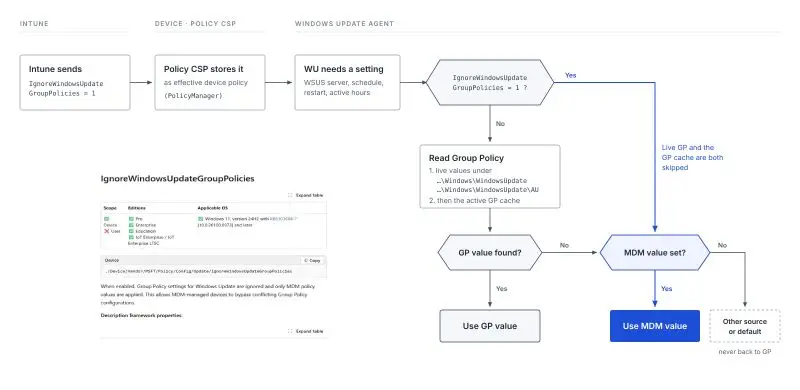
Most admins hear “MDM wins” and assume Intune settles Windows Update conflicts the same way it settles everything else — by overriding Group Policy when both are present. IgnoreWindowsUpdateGroupPolicies doesn’t work that way, and the distinction actually matters if you’re planning a WSUS or GPO-to-Intune migration. This setting doesn’t let MDM beat Group Policy in a conflict. It stops Windows Update from reading Group Policy at all.
Key takeaways
IgnoreWindowsUpdateGroupPolicies is a device-scoped Policy CSP setting (Update/IgnoreWindowsUpdateGroupPolicies) that, when set to 1, makes Windows Update skip its Group Policy reader entirely — both the live GP values and the cached GP fallback — and go straight to MDM-managed sources. It requires Windows 11, version 24H2 with KB5101684 or later. It doesn’t delete the GPO, clear any cache, or stop Group Policy refresh — the old policy stays exactly where it is, just unread by Windows Update. That makes it a genuinely useful lever for staging a WSUS/GPO-to-Intune migration without having to pull the domain policy at the exact same moment every device moves.
What’s actually being checked, and where
Intune delivers the setting via the Policy CSP. The device stores it as effective policy through PolicyManager, at:
HKLMSOFTWAREMicrosoftPolicyManagercurrentdeviceUpdate
IgnoreWindowsUpdateGroupPolicies = 1 (DWORD)
The OMA-URI path for a custom profile (or the equivalent built into newer Settings Catalog builds) is:
./Device/Vendor/MSFT/Policy/Config/Update/IgnoreWindowsUpdateGroupPoliciesWhen the Windows Update Agent needs a setting — WSUS server, scan schedule, restart behavior, active hours — it checks this value first. If it’s 1, the agent skips straight past Group Policy to MDM and other managed sources. If it’s 0 or absent, Windows Update follows its normal order: live Group Policy values, then the cached GP fallback, then MDM, then other defaults.
Why this needed its own setting instead of just MDMWinsOverGP
The usual tool for GP-vs-MDM conflicts is ControlPolicyConflict/MDMWinsOverGP, which works by comparing a known GP-to-MDM policy pair and letting the MDM value win. Microsoft’s own documentation notes that mechanism doesn’t apply to the Update Policy CSP — there isn’t a guaranteed one-to-one pairing between every Windows Update Group Policy setting and its MDM equivalent for this to compare against. Windows Update needed a bypass that operates earlier in the process, at the level of “don’t go looking for Group Policy at all,” rather than a tiebreaker that assumes both sides are evaluating the same named setting.
The real use case: staging a WSUS/GPO exit without a flag day
This is the part that makes the setting worth knowing rather than a curiosity. A WSUS or domain-GPO cutover to Intune usually forces a coordination problem: pull the GPO too early and unmanaged devices lose their update policy; leave it too long and devices still reading it ignore the MDM configuration you just rolled out. IgnoreWindowsUpdateGroupPolicies breaks that coupling. You can leave the legacy GPO exactly where it is — same registry keys, same domain policy, no cleanup required — and flip the bypass on a cohort of MDM-managed devices so they stop reading it, while devices you haven’t migrated yet keep working off the GPO as before. The cutover becomes a per-device switch instead of an all-or-nothing policy removal.
What it deliberately does not do
- It doesn’t delete anything. The GPO, the registry keys under
PoliciesMicrosoftWindowsWindowsUpdateand...AU, and the GP cache all stay intact and keep refreshing normally — Windows Update just stops consulting them for the affected device. - It doesn’t supply a replacement value. Bypassing Group Policy doesn’t mean Windows Update falls back to Microsoft Update defaults automatically — if MDM hasn’t actually configured the setting in question, you can end up with neither source providing it. Know what you’re deploying alongside this, not just the bypass itself.
- It’s fully reversible. Remove or disable the managed setting and the device goes back to evaluating Group Policy for Windows Update normally, no residual state left over from having had it enabled.
Confirming it’s actually in effect
Seeing the assignment reach a device in Intune isn’t proof it’s doing anything — check the delivered value directly:
$path = 'HKLM:SOFTWAREMicrosoftPolicyManagercurrentdeviceUpdate'
$name = 'IgnoreWindowsUpdateGroupPolicies'
$key = Get-Item -LiteralPath $path -ErrorAction SilentlyContinue
if ($key -and $key.GetValueNames() -contains $name) {
    $key.GetValue($name)
} else {
    'No effective value present.'
}
Even that only confirms the policy landed, not which source a given Windows Update scan actually used — validate with a controlled update check on a pilot device before trusting it across a migrating fleet.
Bottom line
The name invites the wrong mental model. This isn’t Intune “winning” an argument with Group Policy the way MDMWinsOverGP settles a mapped conflict — it’s Windows Update being told not to ask Group Policy the question in the first place. That’s a small distinction with a real payoff for anyone migrating off WSUS or legacy Windows Update GPOs: the old policy can stay in place, untouched, while the Intune-managed population moves off it on its own schedule.