KB5124008 Broke Remote Desktop Services: What Windows Admins Need to Do Now
Microsoft confirmed on September 11, 2026 that its September Patch Tuesday updates — primarily KB5124008 — can destabilize Remote Desktop Services well enough to lock admins out of the machines they’re trying to patch. If you manage update rings for any Windows fleet, this is exactly the kind of regression that should change how you deploy this month’s cumulative update, not just something to read and move on from.
Key takeaways
KB5124008 (September 2026) can break RDP on a wide range of Windows client and server versions — connections work at first, then fail after several minutes, sometimes hanging at “Please wait for the Remote Desktop Configuration.” Microsoft calls it “Mitigated” but has not shipped a permanent fix. If you haven’t deployed this update fleet-wide yet, test it against a pilot ring of RDS hosts first and keep a management path that doesn’t depend on RDP.
What’s actually broken
According to Microsoft’s Windows release health dashboard, affected Remote Desktop Services environments look fine right after the update installs, then degrade: “RDP connections may begin failing after several minutes. Users can encounter sign-in failures, while servers may remain stuck indefinitely at the ‘Please wait for the Remote Desktop Configuration’ screen.” Microsoft Management Console, the RDS Licensing Diagnoser, and File Explorer can also become unresponsive, and the Windows Update settings page can hang with a persistent loading indicator.
The affected surface is broad — Windows 11 23H2 through 26H1, Windows 10 21H2 and 22H2, Windows 10 Enterprise LTSC 2016/2019, and Windows Server from 2012 through 2025. If you’re running a mixed fleet with any RDS role, this isn’t a corner case.
Where Microsoft stands right now
- Status: “Mitigated,” set three days after the September 8 Patch Tuesday release — not “Resolved.”
- Classified as a reliability regression, not an exploited vulnerability — which is why it’s tracked on the release health dashboard rather than treated as an emergency security advisory.
- No permanent fix yet. Microsoft says a resolution is coming in a future update, with no date attached.
- Don’t uninstall the security update as a workaround — Microsoft is explicit that doing so drops the protective coverage the update shipped with, and the instability can recur even after a temporary fix.
If a VM is already stuck
Microsoft’s stated workaround for an inaccessible virtual machine is blunt: stop or deallocate the VM, then restart it. That restores connectivity — temporarily. It is not a fix, and the instability can come back. For anything you can’t afford to lose access to, that’s a stall tactic while you get a real management path back, not a resolution.
What to actually do this week
- Check whether KB5124008 has already deployed to your RDS session hosts and any server with the Remote Desktop role, via your update-ring or WSUS reporting.
- If it hasn’t deployed fleet-wide, pause it there. Hold the update on RDS-role servers in your rings while you validate, even if workstations proceed on schedule.
- Confirm you have a non-RDP path into every affected server before you touch anything — a hypervisor console, a cloud provider’s serial/VM console, or an out-of-band management interface. If RDP is your only way in, fix that first.
- Pilot the update on a small ring of RDS hosts and actually wait — the symptom appears “after several minutes,” so a five-minute smoke test won’t catch it.
- If you’re already hit, deallocate and restart the affected VM to regain access, then open a case with Microsoft Support for Business rather than improvising further.
- Don’t roll back the security update without weighing the exposure that creates against the RDS instability — for most environments, staying patched with a workaround beats reverting.
The update-ring lesson underneath this
This is the exact scenario ring-based deployment exists for. A staged rollout — IT and volunteers first, a pilot department next, the fleet last, each with a deliberate soak time — catches a regression like this on ten machines instead of a thousand. In Intune, that’s update rings with staggered deferral days between groups; in WSUS, it’s deployment rings with the same principle by another name. If your RDS session hosts sit in the same ring as everything else, this is the argument for splitting them into their own ring with a longer hold, permanently — not just for this month.
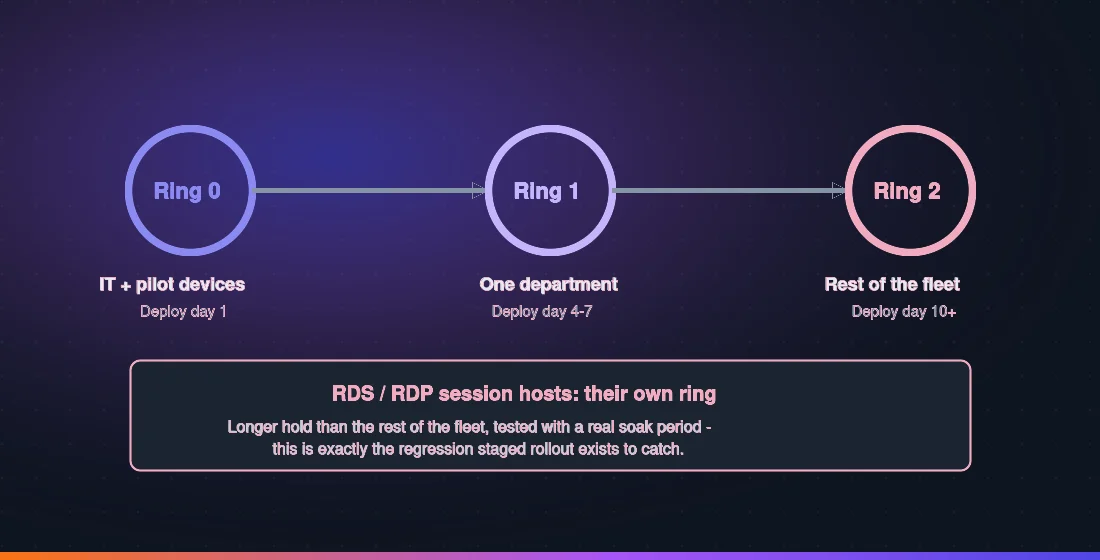
It’s also a reminder to keep management planes separate. If the only way you can reach a server is the exact protocol this bug breaks, one bad patch Tuesday shouldn’t be able to lock you out of your own infrastructure.
Bottom line
KB5124008 is “Mitigated,” not fixed, and it can take Remote Desktop Services down after it looks like it installed cleanly. Test it against RDS hosts in an isolated ring, keep a non-RDP way into every server that matters, and don’t uninstall it outright. The deeper fix is the one you put in place before the next regression: RDS and other remote-access infrastructure in their own slow-deploy ring, with an always-available out-of-band management path.
Source: Cyber Security News, reporting on Microsoft’s Windows release health dashboard, September 14, 2026.